
Pipedrive: The Complete CRM Guide for Sales Teams in 2026
Pipedrive is the easiest visual pipeline CRM on the market, built for salespeople rather than administrators. I explain what it is, what it's for, how it works, what it costs in 2026 and whether it's worth it compared to HubSpot or Salesforce.
 Pablo Giménez·Updated: 2026-08-27
What Is Pipedrive, in a Nutshell
Pipedrive is a visual pipeline CRM that takes your sales from first contact to closing, stage by stage. You can get the hang of it in an afternoon, it doesn't get in the way of your sales team, and its plans start at 14 euros per user per month with annual billing. It is built for SDRs, freelancers and small teams.
What Is Pipedrive
Pipedrive was founded in 2010 in Estonia with a very specific idea: a CRM should look like a sales rep's desk, not like a government filing system. Instead of endless forms and fields to fill in, you get a visual funnel where every deal is a card you drag from one stage to the next.
That philosophy explains its success. More than 100,000 sales teams use it according to its own website, and on platforms like Capterra or GetApp it keeps ratings above 4.5 out of 5. When you ask a salesperson which CRM they use and they don't make a face, chances are it's Pipedrive.
I've seen it work in agencies and small sales teams, and the feeling is always the same. People actually use it, they don't fill it in because they're forced to. That's the difference from corporate CRMs that end up as data graveyards.
What Is Pipedrive Used For
Pipeline Management
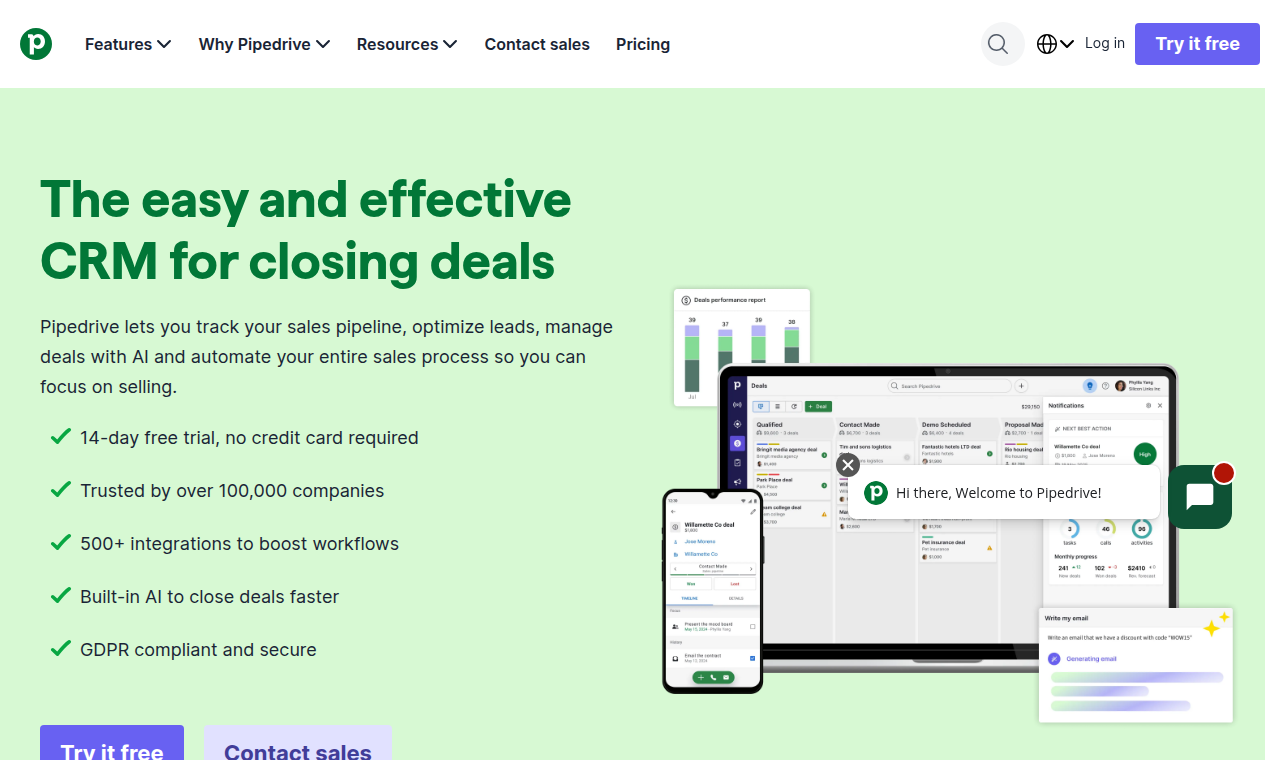
The pipeline is the heart of it. You see all your deals in columns by stage, with each one's value, and you drag the card forward when it moves. In two seconds you know what's at stake, where everything gets stuck and how much you can close this month.
Activity Tracking
Pipedrive is aggressive about tasks. Every deal carries associated activities, calls, emails and deadlines, and the system reminds you what's on the agenda today. For an SDR who lives off constant follow-up, this is gold.
Task and Follow-Up Automation
You can automate the repetitive steps: create tasks when a deal moves, send an email when an opportunity enters a stage, assign leads to the right rep. No code needed and the flows take minutes to set up.
Built-In Email and Calendar
It syncs with Gmail or Outlook, tracks opens and clicks, and logs the whole history on the deal record. The calendar integrates so meetings stay linked to the contact without copying and pasting anything.
Activity Reports
The reports tell you how many calls each rep has made, how many deals they've moved and which stages convert best. If you manage a team, it's the difference between managing by gut feel and managing by data.
How Pipedrive Works
Let me walk you through a real day of work. You log in, see your funnel with open deals and today's pending tasks. You call the contact, take notes on the record, move the deal to the next stage and Pipedrive creates the next follow-up task for you automatically.
Every deal has its value, its expected close date and its full interaction history. Team reports update themselves, so your boss or your partner can see the real state of things without you having to write a summary every Friday.
The learning curve is the smoothest I've seen in a CRM. In one afternoon you set up your pipeline, import your contacts from a spreadsheet and start working. You can't say that about almost any alternative.
One nuance to keep in mind. Pipedrive focuses on direct selling, on the pipeline. It's not an inbound CRM with built-in marketing. If your business depends on attracting leads with content, you'll miss a piece and need to combine it with other tools.
How Much Does Pipedrive Cost in 2026
These are the prices from Pipedrive's official website in euros, per user per month, with annual billing. Monthly billing is noticeably more expensive, so the annual plan clearly pays off. Prices don't include VAT.
| Plan | Price per month | Highlights |
|---|---|---|
| Lite | 14 euros | Visual pipeline, AI reports, 500+ integrations |
| Growth | 39 euros | Email sync with tracking, automations and sequences |
| Premium | 59 euros | LeadBooster, scoring, contracts and e-signatures |
| Ultimate | 79 euros | Advanced security, sandbox, extended phone support |
The Premium plan is the most popular because it combines lead generation with closing. All plans come with a free 14-day trial, no card required.
There are also add-ons you pay for separately. LeadBooster to capture prospects from your website, Projects for project management, Campaigns for email marketing, Web Visitors or Smart Docs for documents. Depending on what you put together, the real cost can exceed the base plan price.
Key Features of Pipedrive
- Visual stage-by-stage pipeline
- Task and follow-up automation
- Email and calendar integration
- Team activity reports
- Built-in AI for reports and email drafting
- 500+ integrations with Zapier, Zoom and friends
Pipedrive vs the Alternatives
HubSpot is the other big name. Its free CRM is more generous and its marketing ecosystem is unmatched, but from there the price climbs fast and contact management gets more complex. Pipedrive wins on simplicity and a predictable per-user price.
Salesforce is the enterprise league. Brutal power, but also a learning curve measured in months and a price you have to negotiate. If you have fewer than twenty salespeople, it's hard to justify against Pipedrive.
Zoho CRM is the price competitor, lots of functionality for little money. The catch is that the interface and support lag behind. Pipedrive charges a bit more and gives you an experience people actually use.
And if what you're missing is leads, remember that a CRM without contacts is an empty canvas. I recommend my article on B2B prospecting for freelancers to build your lead generation from scratch, and this one on prospecting tools for marketing agencies if you manage several accounts.
Who Pipedrive Is For and Who It Isn't
Pipedrive is for SDRs, freelancers who sell, sales teams of up to twenty people and agencies that want to see each client's pipeline without complications. If your sale is consulting, services or a product with a medium decision cycle, it fits perfectly.
It's not for teams that need built-in marketing automation, nor for companies that live off inbound and want everything on one platform. Nor for organizations with very long sales processes and lots of approvals, where a Salesforce or a HubSpot Enterprise performs better.
If you also work the LinkedIn channel, don't forget that prospecting and CRM complement each other. LinkedIn automation fills your funnel with contacts and Pipedrive organizes them. Two pieces of the same machine.
Pros and Cons of Pipedrive
The good:
- Minimal learning curve, you get it in an afternoon
- Visual pipeline the team actually uses
- Very practical follow-up automations
- Clear activity reports for managing a team
- Predictable per-user price
The bad:
- Built-in marketing is conspicuous by its absence
- Add-ons push the final bill up
- AI and new features land better on higher plans
- Advanced reporting falls short of dedicated BI
Is Pipedrive Worth It?
Yes, if your job is selling and you want a CRM that doesn't steal hours from selling. It's the most sensible option for small and mid-sized teams that want order without bureaucracy.
My concrete recommendation: start with the Lite plan on the 14-day trial, import your real deals and work a week with your usual flow. If after that week you're still opening the tool every day, keep it. If you don't open it, the problem isn't the CRM, it's you or the process, and no tool fixes that.
Written by
Pablo Giménez
Lead analyst · LinkedIn prospecting
6+ years prospecting on LinkedIn for agencies and SaaS. He tests every tool with real accounts before sharing his opinion, and writes so you do not repeat his mistakes.
Specialty: LinkedIn automation, Waalaxy, account safety
Pipedrive
Pipedrive